What's New

1.56

New in Version 1.56

🍳 Recipes

  • Build a recipe from scratch, paste in a link from your favorite recipe site, or just describe what you want and let AI put it together for you
  • Browse a library of ready-made recipes, each one automatically sized to your meal's macro targets, with a photo on every card
  • Apply a recipe to a single meal or across several days at once, fit to your numbers and rebalanced for you
  • Turn any meal you've already built into a saved recipe with "Save as recipe" right from the meal menu, then reuse it anytime

πŸ”„ Your food combos are now recipes

  • Every saved food combo has automatically become a recipe, so nothing you built is lost
  • Find all of them, alongside your new recipes, under More β†’ Recipes
1.55

New in Version 1.55

πŸ“Έ Meet the AI Food Scanner

  • Snap a photo of your plate and the app identifies each food, estimates your portions, and adds them straight to your meal
  • No photo? Just describe your meal ("chicken bowl with rice and guac") and get the same itemized result
  • Every food comes in as its own row you can edit, swap, or remove, and you can resize the whole meal to a calorie target before you log
  • Scan a product's barcode or a nutrition label from the same screen too, right next to Add foods on every meal
1.53

New in Version 1.53

✨ Improvements

  • The Pantry has been rebuilt from the ground up. Opening, searching, and adding foods is much faster
  • Recents, Favorites, and Custom foods now each have their own tab in the Pantry, with their own sort
  • RP Foods are once again organized by macro (Protein, Veggies, Carbs, Fat) instead of one big alphabetical list
  • If you mistype a food name, the Pantry now suggests a correction
1.52

New in Version 1.52

✨ Improvements

  • You can now redistribute macros to meals with foods in them
  • You can now mark as meal as 'Still planning' to tell the app to use the target macros instead of the food macros when calulating your Day Status
1.22.29

New in Version 1.22.29

✨ Improvements

  • Stops auto updating target macros when foods are saved!
  • Improves meal open/edit transitions.

πŸ”§ Fixes

  • Fixes surprising interactions between check-ins and editing.
  • Fixes meal screen crashes during push/pull from day balance.
  • Fixes target daily calories changing when they should not have.
1.22.28

🀨 What the h*ck?

🀨 What the h*ck?

  • The app was way too complicated and we were trying to do too many things in too many places.
  • We're trying to make it more powerful and flexible but also simplify things visually to make it easier to understand and use.

πŸ“ What's different?

  • We always show the target macros for meals now, whenever you're not editing them.
  • Saving meals with foods now updates the target macros. We know that's not quite right yet but bear with us as we workout the kinks and thanks for your feedback.

πŸ§‘β€πŸ’» What's next?

  • Better meal experience, which we've already been working on but needs a bit more work and internal testing.
  • A dedicated screen for seeing planned foods and their details for current/other days.
1.20

New in Version 1.20

πŸš€ New Features

  • ⌨ Manual entry of food amounts.
  • πŸ” Adds ability to lock food amounts. Rebalance will preserve existing amounts. Locks are saved in new food combos.
  • πŸ“ˆ Meals can now be saved over macros. Remember, with great power comes great responsibility.
  • πŸ§ͺ Improves options for using food combos. Choose from exact, scaled, or fully automatic amounts. Locked amounts will always be preserved exactly.

πŸ”§ Fixes and More

  • Fixes preferred meals missing from Weekly Review schedule editing.
  • Fixes an incorrect warning about unsaved changes when closing a meal.
  • Fixes a bug where some diets were not being archived.
  • Adds links to tutorial videos during diet creation.
  • Adds a single question survey to find out where you heard about us.
1.16.0

New in 1.16

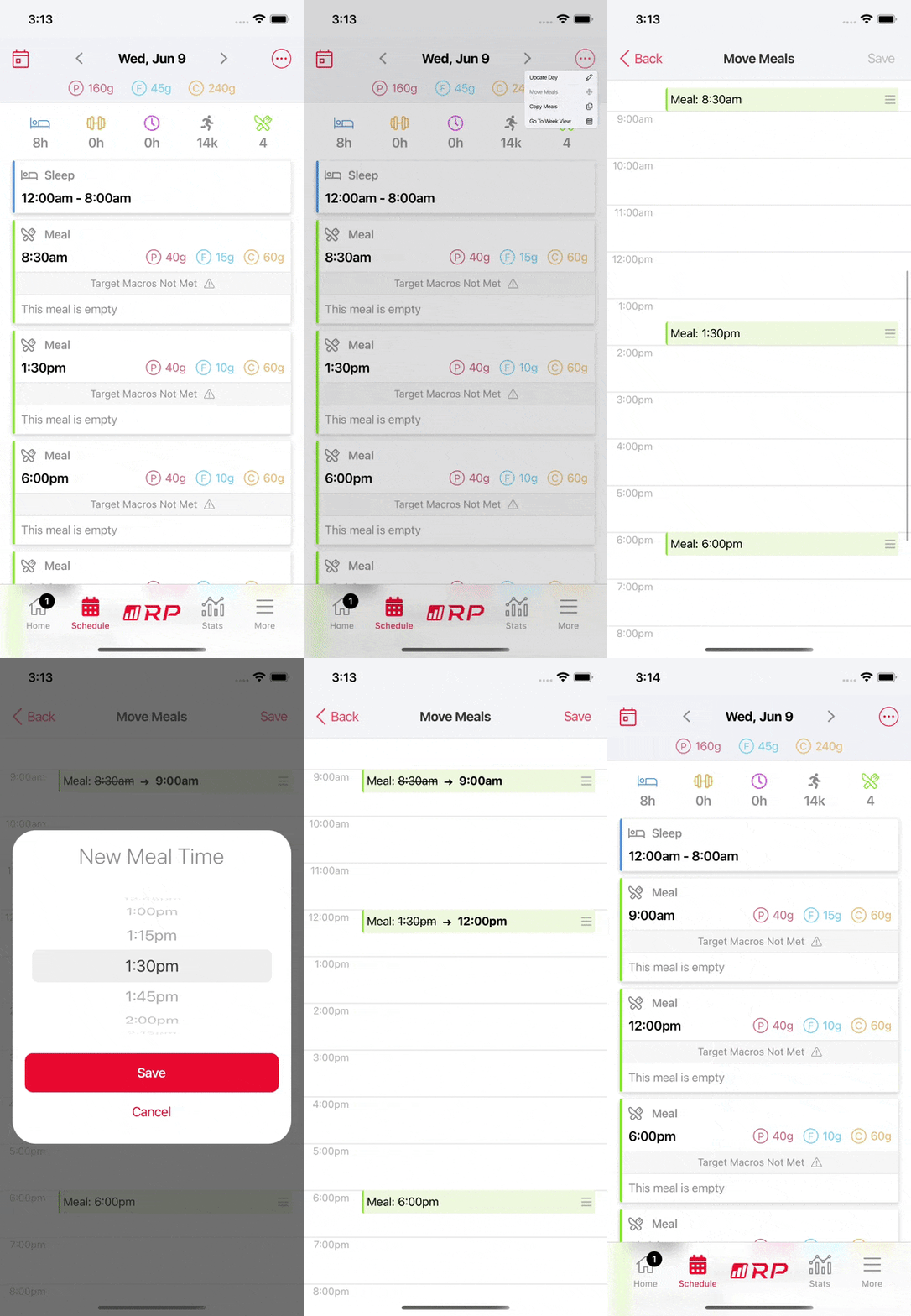
  • Meal times can now be moved
  • Weigh-ins can now be scheduled for every weekday
  • Fixes minor visual bugs

Move Meals

Meal time moving

1.14.16

Diet 1.14.16

Good news everyone!

Based on your feedback around schedule changes we've streamlined the editing process and implemented some easier default behavior. You can now also edit your recurring schedule from the More tab without changing the current week.

New in Version 1.14.16

✨ Improvements

  • Improves editing of recurring vs one-off schedule
  • Updates look of schedule screen with a better summary of the day

πŸ”§ Fixes

  • Fixes an issue with mid-day edits could be scheduled before the chosen time, depending on timing of the meals and activities
  • Fixes an issue where copying an activity during one-off updates would display the wrong date
1.14.9

New in Version 1.14.9

✨ Improvements

  • When making a recurring edit to your schedule and deselecting repeat days, you can choose whether to keep or delete those repeated activities.
  • Makes display of repeat days more intuitive when opened from a day other than the start day.
  • Moves the choice of planning new meals when editing the current day to the Preview screen rather than in a pop-up.
  • Don't allow selection of midday edit times that conflict with new schedule.

πŸ”§ Fixes

  • Fixes subscription options not loading for some users
  • Prevents a Weekly review done with days missing sleep from causing problems.
  • Fixes crash when changing food display units while using custom foods.

New in Version 1.14

πŸš€ New Features

  • Night shift schedules now supported
  • Schedule busy times when you can’t eat (intermittent fasting now possible!)
  • More meal frequency options - between 2 and 8 meals per day depending on waking hours
  • Small / Medium / Large adjustments during weekly reviews
  • Preview your diet changes before confirming weekly adjustments
  • Diet goal recommendations based on our research of over 10k diets

✨ Improvements

  • Enhanced metabolic learning - Maintenance following Fat Loss and Muscle Gain diets now tailors your macros more precisely to your needs
  • Preview your macro changes when editing your lifestyle
  • Meal check-ins are now optional
  • More powerful day-level copying
  • Display in 24-hour time format
  • Better macro programming based on latest research
  • One-time schedule edits so you don’t mess up your β€œnormal” schedule

πŸ”§ Fixes

  • Recently used β€œExpanded” foods now carry over between diets
  • You can start diet on the same day now
  • See and edit your last weigh-in during weekly review